Vulnerability Assessment · iX 9/2005
Looking for holes
Anyone seeking to deny intruders any opportunity needs to examine their network regularly, looking for security-relevant vulnerabilities. There are plenty of scanners available to do this. Testing shows how effective they are.
- A good vulnerability scanner does not simply find a lot of vulnerabilities; it is just as important that the number of false positive messages should be kept as low as possible.
- For a company that uses a mixture of IT assets, a scanner should produce satisfactory results for every possible operating system and be capable of being integrated into any existing vulnerability management systems.
- Such scans are a useful way of improving security in the corporate network — however, one cannot rule out the possibility of an attack still occurring.
The test
In the iX test, nine software and hardware vulnerability scanners (appliances) were put under the microscope. The companies NetIQ, Ncircle and Symantec did not provide any test software. The test network in which the products were tested comprised 19 systems with operating systems from different manufacturers, dating from 1996 up to the present day, and different hardware.
When one scans a network for vulnerabilities and security problems, one does not simply gain information about its status. Rather, the system administrator uses the data generated to determine what applications such as patch and risk management, problem handling etc. are needed, which is thus critically influenced by the quality of the results.
Some of the products provide other vulnerability management functions in addition to scanning, for example for gathering data on system status, patch management or ticket-based problem management. However, our tests concentrated solely on the primary functions, namely the detection and description of vulnerabilities.
The main action performed by the test candidates was to search over the network for open ports and the services running on them. In addition, assuming that they had this capability, they were allowed to log on to various systems and to carry out local investigations.
The test network consisted of an intranet with 19 computers. 13 of these ran on a machine with 3 GHz processor and 4 GB RAM as virtual computers. All of them were connected with a switch and had access to the internet via a router with Network Address Translation (NAT). Each of the software scanners was installed in a separate virtual machine. With hindsight, the test environment was not ideal, but all the scanners were on a level footing since the same set of assumptions applied to each of them.
Compatible data is an advantage
The scan results are also relevant to intrusion prevention and detection systems (IPS and IDS). Moreover, in larger networks several scanners, whose results the administrator will want to compare, are frequently used. For this reason, it is desirable that the data should be delivered in a standardised format. Unfortunately, each scanner has its own formats and therefore its results require “translation”.
In this area, solutions are available from two standardisation bodies for the XML schema. In 2003 OASIS published the Application Vulnerability Description Language (AVDL), which has not been developed any further since then, while a year earlier MITRE offered an XML schema for describing vulnerabilities, patches, requirements, data collection and results in the form of the Open Vulnerability and Assessment Language (OVAL). The organisation has already defined the most well-known vulnerability standard for naming and enumerating known vulnerabilities in a uniform way, the Common Vulnerabilities and Exposures (CVE).
When it comes to weighting the vulnerabilities, there is a further lack of compatibility: every scanner classifies the risk level (highly critical, medium, low) in its own idiosyncratic way, which not only makes it difficult to assess the vulnerabilities found, but also makes it difficult to compare the scanners. The administrator should be cautious in handling results which put the lion’s share of the vulnerabilities detected either very high or very low in the scale of threats. It would be more realistic for around 20 percent of vulnerabilities to be classified as highly critical, 50 percent medium and 30 percent less critical.
The National Infrastructure Advisory Council (NIAC) has recently been trying to establish standardised measuring units for the degree and urgency of vulnerabilities, with its Common Vulnerability Scoring System (CVSS).
Every scanner was given two opportunities to show what it could do. The first pass was performed with the standard settings for a quick run, which carries out all the tests that do not hurt the target system. In the second pass, every scanner was initiated manually with all the available options. These included a complete scan of all the ports. In addition, where possible, the scanner was given a password. On the basis of security aspects, on UNIX systems the scanner logs on as a normal user, whereas Windows systems require administrator access for certain functions such as reading the registry. The present evaluation is based on the results of the second pass.
The number of messages generated is not necessarily an indication of the quality of a good scanner. For example, the Saintbox produces relatively few messages, but these contain a lot of problems and also their CVE numbers, so this product comes out very well when evaluated on the basis of CVE numbers.
One would expect the results of the second pass to be more extensive than the first, partly because the scanners were now examining more ports, but mainly because most of them also logged on to the systems and were thus able to generate more results, which were also more precise. If there is no increase, this suggests that little has been carried out in the way of local tests, either because the scanner does not support this feature or because it did not work.
True, false and missing
The central aspect of the evaluation of the data gathered in the test is the analysis of the correctness and completeness of the messages. The measure used is the number of CVE numbers found: firstly the correct ones, i.e. all the vulnerabilities found that actually are vulnerabilities; secondly the false messages, that is items that were incorrectly classified as vulnerabilities; and thirdly the missing vulnerabilities that were not detected.
The latter is calculated as the difference between the CVE numbers found by a given scanner and the numbers found by all of them together. In this way it is possible with reasonable effort to obtain a useful approximation to the number of missing messages.
Altogether, 1,745 different CVE/target system combinations were extracted from the 4,414 CVEs reported by the scanners. Each of these combinations stands for one specific problem on one system. With all the combinations it was necessary to assess whether the result was a genuine finding or a false positive. The individual judgements were based on attempts to perform exploits, research in SecurityFocus’s vulnerability database and manufacturers’ advisories. In this way a total of 787 true and 509 false CVEs was crystallised. 449 could not be clearly determined as either true or false. The results obtained with the individual scanners were then compared against the approximately 1,300 verified and reliably determinable CVE numbers.
Results
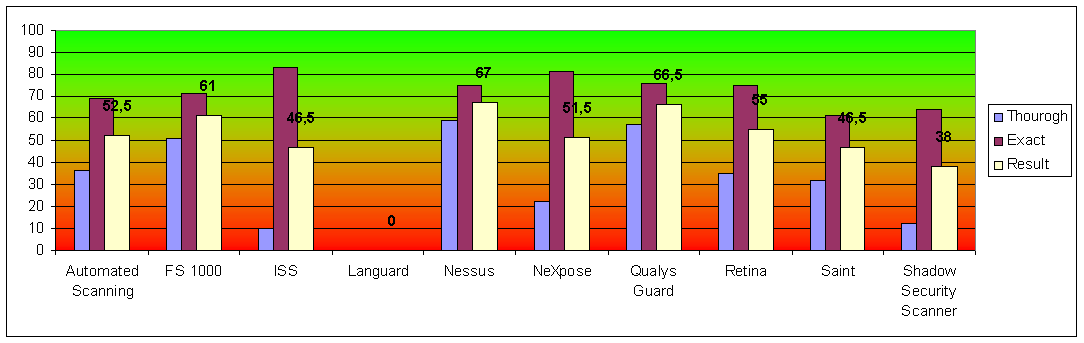
To give an example, Nessus reported 608 CVEs out of the 787 possible, and of the CVEs it reported 459 were true. This corresponds to a thoroughness of 58 percent and an accuracy of 75 percent.
| Scanner | CVE true | false | missed | Thorough | Exact | Result |
|---|---|---|---|---|---|---|
| Nessus | 459 | 149 | 328 | 58 % | 75 % | 67 |
| Qualys Guard | 455 | 143 | 332 | 58 % | 76 % | 66.5 |
| Foundstone FS 1000 | 407 | 168 | 380 | 52 % | 71 % | 61 |
| eEye Retina | 281 | 92 | 506 | 36 % | 75 % | 55 |
| Automated Scanning | 284 | 126 | 503 | 36 % | 69 % | 52.5 |
| Rapid7 NeXpose | 178 | 39 | 609 | 23 % | 82 % | 51.5 |
| ISS Internet Scanner | 77 | 16 | 710 | 10 % | 83 % | 46.5 |
| SAINT Saintbox | 252 | 160 | 535 | 32 % | 61 % | 46.5 |
| Shadow Security Scanner | 98 | 56 | 689 | 12 % | 64 % | 38 |
| GFI LANguard | reports no CVE numbers | n. a. | n. a. | 0 | ||
The Result column reproduces the figures printed on the chart, and the percentages reproduce the printed comparison table. The two were rounded independently from the same underlying decimals, so a mean computed from the rounded percentages can differ from the printed result by half a point.
Knowledge of CVE numbers desirable
In the present test, the output of CVE numbers was an important criterion for assessing the quality of the scanners. Whereas a scanner that does not do this does not necessarily overlook problems, this can still be a disadvantage. For example, consider an old version of a web server that contains many vulnerabilities. Each of them has a CVE number. For the administrator it is sufficient to receive only a single message which tells him that the version is out of date and poses a risk. On the other hand, for a penetration test or other attempt to accurately assess the degree of risk, it is necessary to know the CVE numbers.
For this reason, scanners that generate many true CVE messages perform well in the comparison stakes. With this method it is not possible to compare scanners that do not use CVE numbers. Of the scanners tested, the only one that fell into this category was the one from GFI.
The more CVEs a scanner reports, the higher the risk that this will include false positives, but the probability that it will report all the existing CVEs is also higher. In the test, a script scrutinised the XML versions of the results reports, looking for CVE numbers.
Tests often out of date
Both numbers are important and are also inseparable. A scanner is only useful if it finds a high proportion of the potential vulnerabilities and the number of false positives is as low as possible. Otherwise too many resources are wasted on non-existent problems.
The discrepancies in the findings reported are serious for virtually all the scanners. For
example, a number of the scanners find a vulnerability for Linux rpc.statd even on
the BSD systems, or an NT 4 exploit is found on Windows 2003. Evidently the scanners
rarely, if at all, carry out any plausibility checking against facts already known on the
relevant systems. The same is true for old tests which there has been no point in running for
some years now. Updates of the existing tests are seldom found.
Similarly, the function of transferring the results of tests carried out on one system to other systems could also be optimised. One example is passwords: if a scanner finds a valid password on one system, it could be profitable to try this password out on other systems.
To determine the suitability of the scanners for heterogeneous IT landscapes, the scan results were considered for the individual operating systems. No scanner detected all the CVE numbers on all the operating systems. Moreover, it turned out that scanners with a high overall hit rate still have weaknesses with individual operating systems. Accordingly, in the comparison table the scan results are broken down by operating system.
The ten scanners
Automated Scanning
Beyond Security · version 2.15.80 · appliance/Linux · 3,019 tests
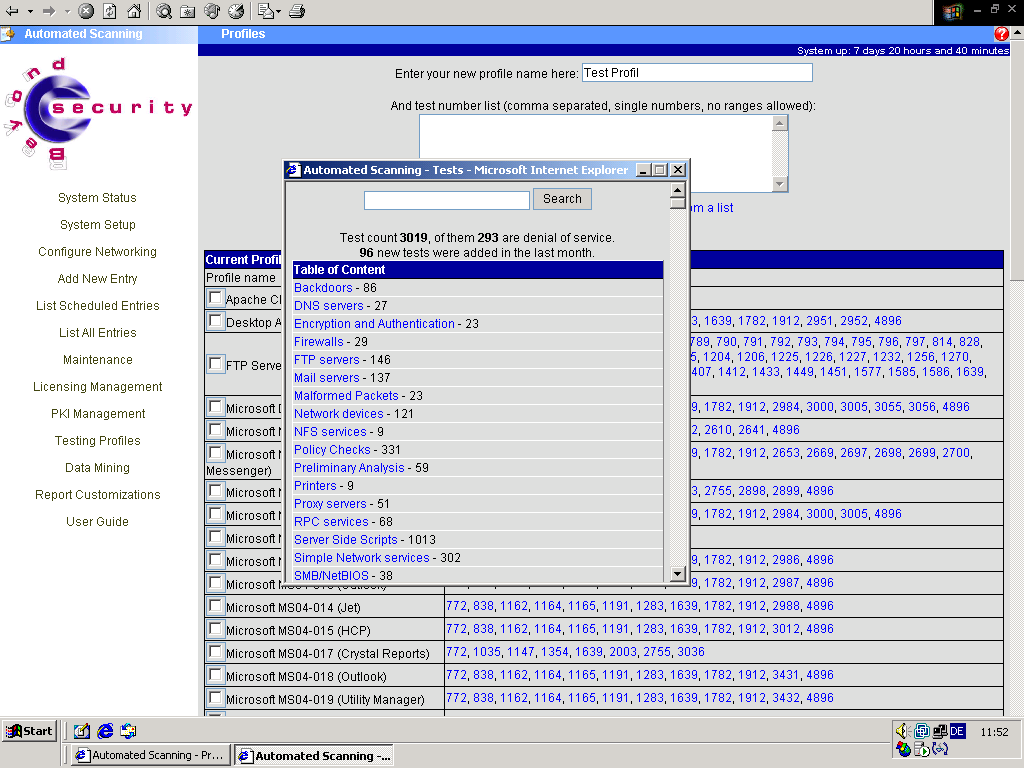
It takes less than a minute to launch a first scan, which is rapidly completed. The display of scan progress is detailed and easy to read. However, the vulnerability scanner failed to find two of the systems on the first attempt.
The user can decide whether to start with a pre-scan, during which the scanner looks for all the systems. From these the user can then select the ones to be tested for vulnerabilities. For each type of scan and the associated tests, all the settings can be changed. Moreover, the user can disable individual tests for all the scans.
The tester can either download the HTML or XML report prepared using the vendor’s own templates or else have them sent by e-mail.
The list of vulnerabilities found is rather concise, but it contains all the important information and references to other web pages. The recommendations on how to eliminate a given problem could be more detailed — they simply state what needs to be done, not how. Any details found on a vulnerability during a test are shown.
One disadvantage is the limited number of local tests: the scanner can only log on to Windows systems.
- Own scan definitions
- Clear, uncluttered operation
- Sends reports by e-mail
- False positives can be marked
- Local tests not extensive
- Few comparisons
Foundstone FS 1000
Foundstone · version 4.0 · appliance/Windows · 2,150 tests
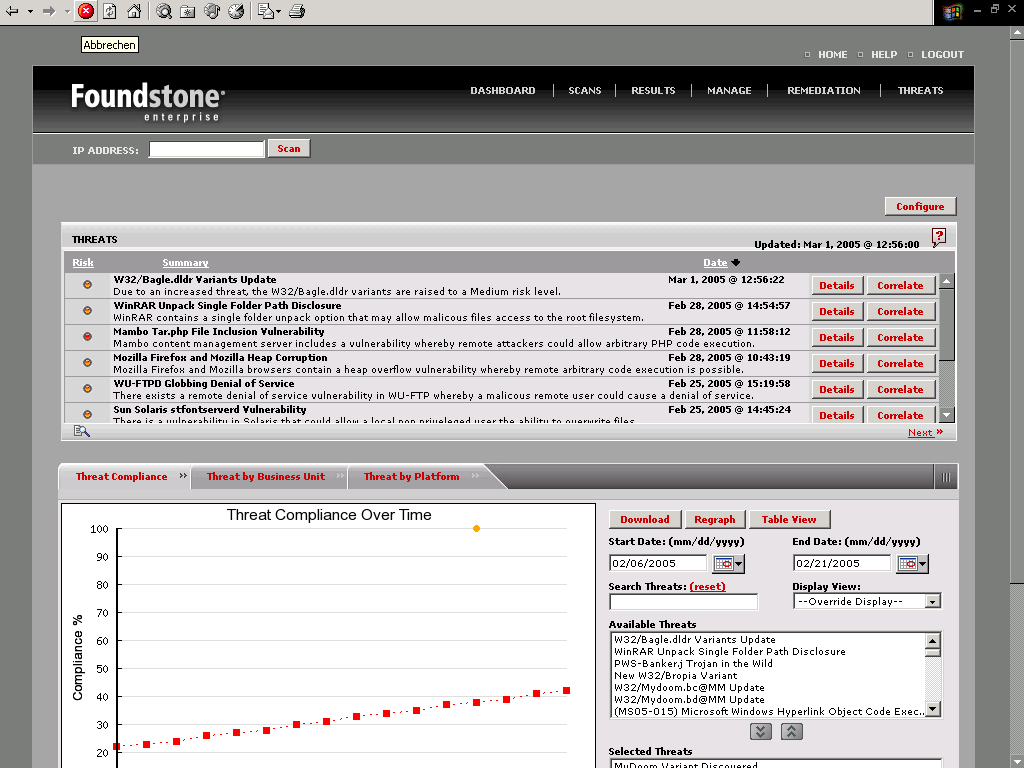
From a single console one can manage as many scanners as one likes. The start page shows the problems that have been found, sorted by either system or risk level, as the user prefers, in the chronological order of the scans that have been carried out. While working over the HTML interface, FS 1000 loads applets for virtually all the pages, speeding the processes up considerably.
The scanner includes a function allowing the target systems to be managed, under which the administrator can assign each one to a group and enter different criticality values for groups or systems. On top of this there are extensive user administration facilities which provide each user with a role, complete with permissions and responsibilities.
Every problem detected generates a ticket in the problem management module, and it is possible to export these tickets to existing systems. If Foundstone processes the tickets itself, one can repeat the test with a click of a button so as to monitor resolution of the problem. These functions were not tested in detail, but they do leave a good first impression.
One special feature is in the area of threat management. Here, FS 1000 can summarise up to six vulnerabilities in a graphical evaluation and trace trends over time per group or per operating system.
The number of parameters for scan types is enormous, but is summarised on each page in a slide control. User names and passwords can be entered for Windows. During the scan there is only a single percentage display for the entire operation. The load on the target systems was higher than with other scanners. The scanner failed to find several systems on the first pass, and in some cases this persisted on the second pass as well.
Reports are supplied in the form of compressed archives. The offline HTML report is the only one among all the test candidates which is easy to navigate. As well as links to further web pages, the recommendations often contain step-by-step instructions. Even the ports are explained and configuration tips are given.
- Manages many scan engines
- Practical ticket system
- Detailed recommendations
- Comparisons over time
- Some errors in operating system detection
ISS Internet Scanner
Internet Security Systems · version 7.2 · software/Windows · 1,427 tests
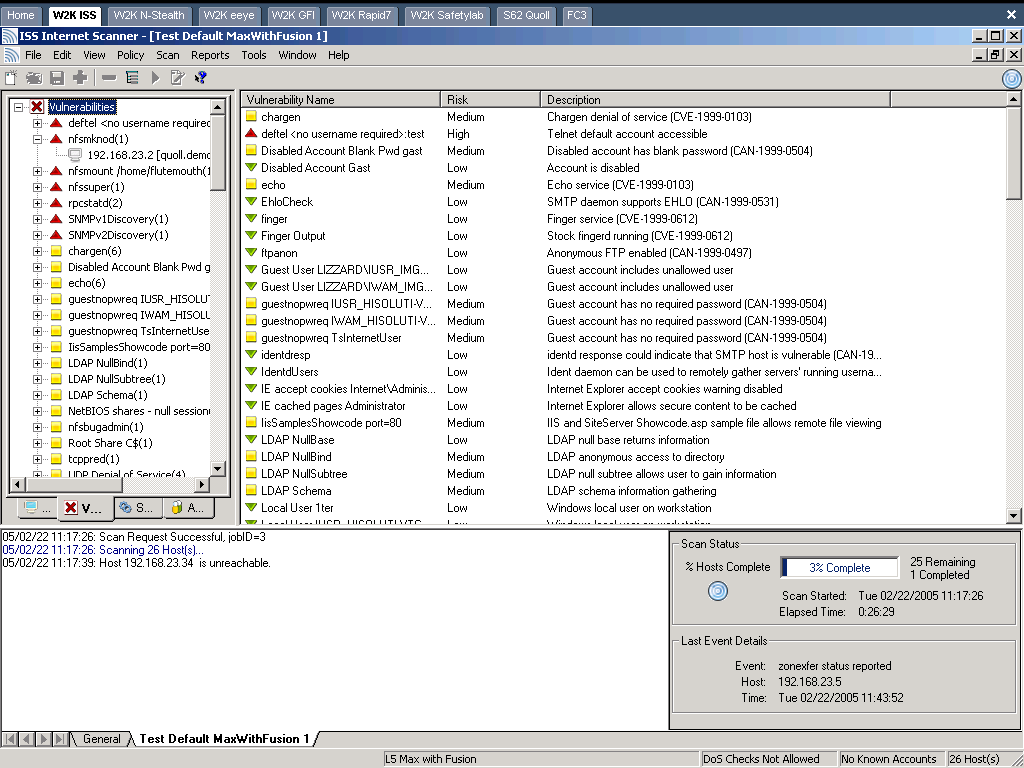
It was ISS that invented the vulnerability scan. The scanner’s user interface appears uncluttered and functional. There is no user prompting using tabs and no update function that starts automatically.
To initiate a scan, one has to create a new session and select the type of scan (here referred to as “policy”). Whereas all the other scanners provide an “Everything except DoS” scan, which is run as standard on the first test iteration, there is no such option here. With the policy editor one can create one’s own scans and have all the tests displayed combined together in groups according to a desired field. “L5 Max with Fusion” was selected for the test, as this sounded the most likely to produce a complete list of all the tests without any denial of service attacks. When it comes to making a selection, the cryptic descriptions of the various scan types are unhelpful.
The results are sequentially available while the scan is still running. One of the target systems was discovered, but it was marked as inaccessible, so no results exist for this. Having completed a rapid scan, ISS offers what is probably the widest selection of reports of all the scanners tested. However they are not necessarily formatted in a way that is helpful to a human reader. Under port 13 (character generator), the output of several kilobytes of characters is unattractive and does not improve the overall impression. The simple statistic of how many problems the scanner found on each computer is hidden in one of the reports.
The ISS product is the only scanner tested that creates a management summary in German. The reports for technicians are in English on this product as on all the others. Once one has got used to the report format, one can find excellent descriptions of the problems and often step-by-step instructions on how to eliminate them as well.
- Few CVEs, but found most problems
- Many reports
- Excellent recommendations
- Cumbersome operation
- One machine not found
GFI LANguard
GFI Software · version 6.0 · software/Windows
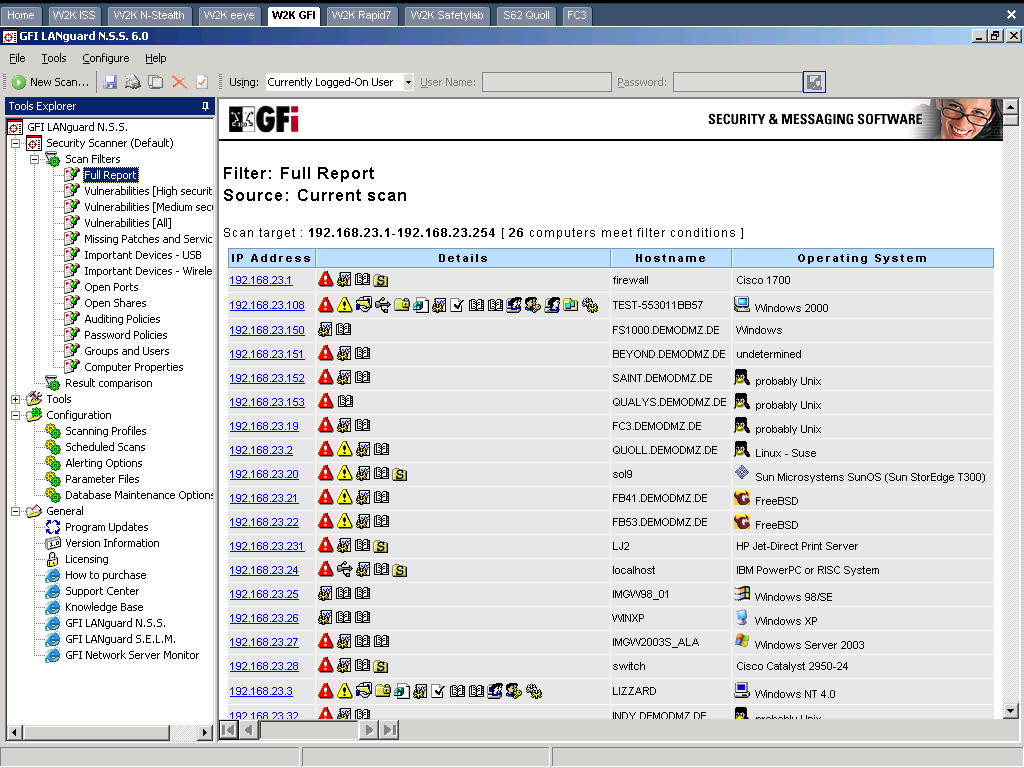
There are only a few options for most of the suitable scan types. The tester can create his own types and edit the files with the predefined values for passwords, user names and port numbers in an integrated file editor. One special feature is the script editor with debugger, which allows one to edit the tests that come supplied and create new ones.
Equally unusual but practical are the tools supplied. These enable one to install updates and software on the systems: there is a format for running traceroute and whois DNS queries, an SNMP walk/audit, a tool for creating user lists and one for auditing SQL servers. The user does not need any other software apart from LANguard to carry out numerous tasks for the administration of Windows networks.
After the extremely brisk scan, the tool invokes one of the “scan filters”, which presents the results as a report. It is possible to create one’s own filters or report templates from the pre-specified elements.
In the case of LANguard, the reports include installed updates and hot fixes. To compare two scans one needs the XML exports. Unfortunately the reports are very difficult to follow and do not contain any CVE numbers either. It was not therefore possible to perform a qualitative comparison with the other test candidates.
- Reports include hotfixes
- Meaningful comparisons
- Practical additional tools
- Confusing reports
- No CVE numbers
Nessus
Nessus · version 2.2.3 · Unix/Windows · 7,867 tests · the only open source candidate
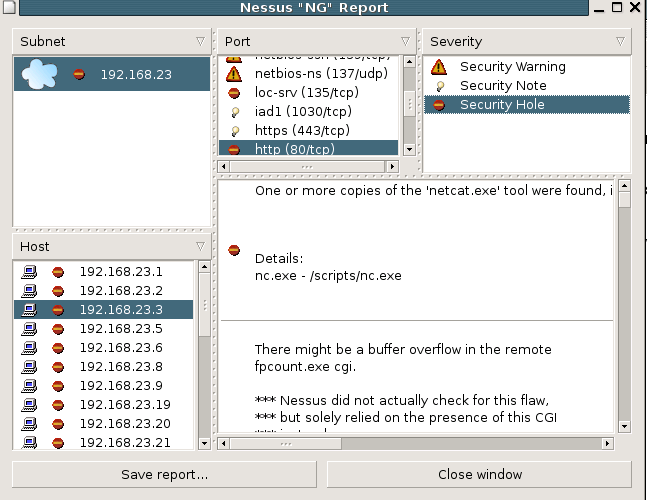
The only open source candidate offers some special features. Thus, it is the only scanner to run under UNIX and be based on a client/server architecture with its own client. For Windows, the NessusWX client has been available for some years and brings some new features with it. It saves all the scan results and settings in a database and can also compare the results of two scans with each other. Furthermore, it allows data to be exported in PDF and HTML, and allows Nessus’s own formats, NSR and NBE, to be imported. With NessusWX, the tester can mark false positive results so that they do not appear in the report.
Recently users have been required to register the installation in order to be able to download any updates. Integrated user administration allows the administrator to determine who is able to scan which IP numbers. The UNIX client can be started either from the command line or via the GUI under X.
Nessus optionally uses several other open source programs that are integrated as plug-ins: port scans perform nmap, Hydra tries out passwords and the web server tests come from Whisker. A debugger is provided for the tests.
The user can vary many of the parameters. Nessus is the only scanner to offer the option of toning down scans in two ways: firstly, with some tests one can choose the “Safe checks” option, and secondly one can disable all the dangerous tests. However, both variants, which were also chosen for this test, reduce the number and accuracy of the results.
Unfortunately new scan types can only be created via a circuitous route. No results are presented until the scanning operation has finished. After the somewhat slow scan, a new window opens, in which the results are presented in a user-friendly way. There are only two types of report. The descriptions of the problems are sometimes somewhat brief and the recommendations contain few specific instructions. Where provided, the results include references to other web pages.
Other products and add-ons based on Nessus are distributed by the company founded by Nessus inventor Renaud Deraison, Tenable Network Security.
- Client and server
- Integrates other programs
- Very good local tests
- Poor recommendations
- No saving of scan types
Rapid7 NeXpose
Rapid7 · version 4.0.8 · software/Windows · more than 2,600 tests
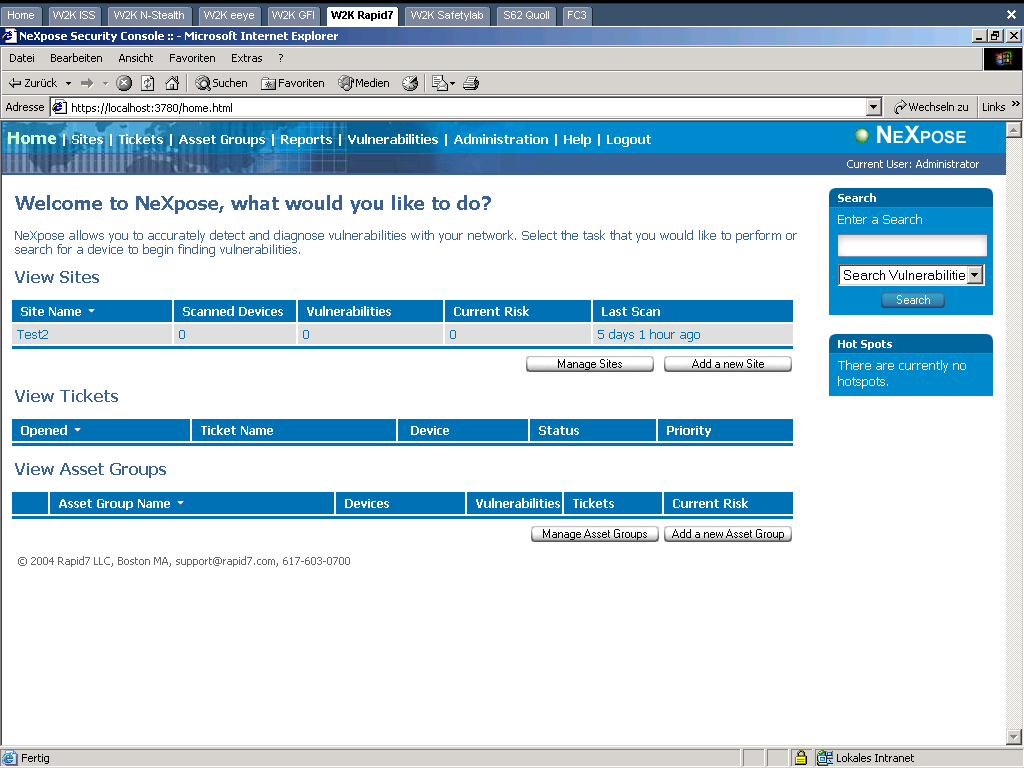
NeXpose proved to be one of two scanners in respect of which testing was problematic. Initially the user starts a server that can be accessed via HTTPS in a command line window. This contains a console for important commands such as starting updates, requesting a licence key or sending log files to support. Unfortunately the product refused to scan any target system until one of the two network cards that connected the VMware with the test network or the file server was deactivated. After that, the scanner worked perfectly and was very quick. But when it came to outputting the reports, there were further difficulties. The program got into an infinite loop and never produced any finished HTML. Some of the problems were solved by e-mail correspondence with the support desk, which responded promptly and competently.
The administrator has to divide the systems up into groups (sites). For these groups he specifies which scanner should check them and whether the vulnerabilities found should be rated more or less critical.
Every event, for example starting a scan or finding a problem, can be sent as an alert by e-mail, SNMP or syslog. This makes the product easy to integrate into administration structures and problem management.
A separate problem management module with full user administration based on roles and permissions is provided with the product. However, the disadvantage is that one has to open the tickets manually. The scan types can only be changed on a group basis. It is not possible to enter new ones or to make major changes to an existing one. One can assign users and passwords to a number of applications, and on this point the product offered more than the others. As the second iteration did not produce significantly more messages than the first one, either the enhanced testing does not work or else none of the tests use the user data.
During the scan, the user only receives information about progress over the console. The reports are down to earth, formatted in a way that is easy to follow and contain good descriptions of the problems. Some of the recommendations include step-by-step instructions. The fact that the reports sometimes provide IP addresses and sometimes computer names causes unnecessary confusion.
- Extensive ticketing
- Logins possible for many services
- Detailed recommendations
- Problems with the reports
- Problems while scanning
Qualys Guard
Qualys · version 2.8.35 · appliance · 4,207 tests
After the user ID is entered on the display of the appliance, Qualys Guard logs on to either the Qualys head office in the USA (for customers based in the US) or to the European data centre in Frankfurt, Germany (for customers based in EMEA), following which it is ready for use. Originally, the only service Qualys offered was to allow scans to run over the internet. This development history probably explains the unusual concept that the appliance does not have a GUI of its own but is addressed via the manufacturer’s portal. Companies which do not allow connections to the outside world from their networks would not be able to use this appliance as it has to be able to connect to head office via HTTPS. Qualys saves the scan data in encrypted form in its databases. According to the manufacturer, this procedure is audited and satisfies the highest security requirements. For an extra charge, the data can also be held within one’s own network.
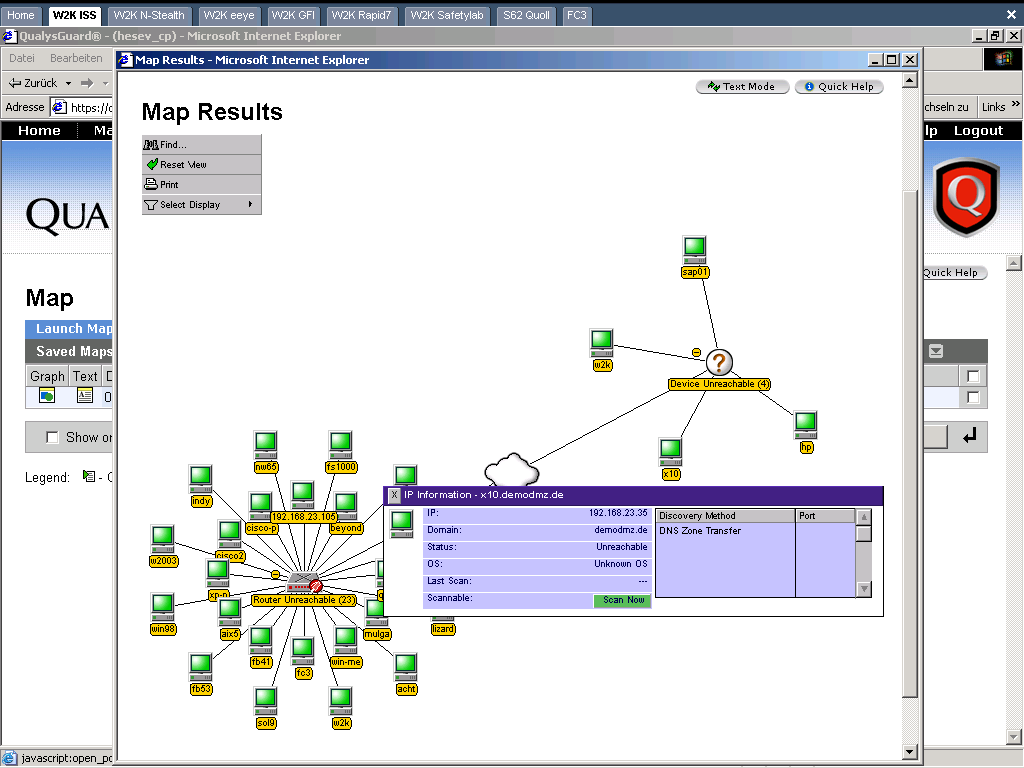
The start page of the portal provides an excellent overview of the status of past scans and their results. External scans and any number of appliances can be administered over the portal. One can also specify as targets domains which the scan system queries by zone transfer. A preliminary scan draws all the equipment found into a diagram which is graphically displayed by an applet. Why the diagram incorrectly shows the test network in two parts is not immediately obvious.
Once the scanner has found the systems and entered them, the administrator can group them and assign multipliers to individual systems or groups, depending on their relevance, and hence weight the risk that they pose in the corporate architecture. When Qualys Guard finds a vulnerability on such a system, it multiplies the risk level for that system with the multiplier. If the threat is low, the multiplier can also be a negative number. In this way it should be possible to arrive at a realistic estimate of the threat.
Every problem found can optionally be included in the integrated problem management module as a ticket. It is possible to transfer this data to a separate ticketing system via an XML interface. These functions were not thoroughly tested, but did leave a good initial impression.
Once again it is possible to configure new scan types with this product, even if the number of options for the scan is not as big. For more advanced tests, one can enter SSH keys or user names for UNIX and Windows. The descriptions in the reports are comprehensive and detailed, but no step-by-step instructions on how to eliminate a problem are provided. Qualys is very active as regards new standards. CVE is supported, the product is OVAL-compliant and the manufacturer announced support for CVSS at RSA 2005.
- Manages many scan engines
- Comparisons over time
- Large selection of reports
- Built-in ticket system
- Requires a connection to head office in the USA
eEye Retina Network Security Scanner
eEye Digital Security · version 5.1.2 · software/Windows · approx. 2,500 tests
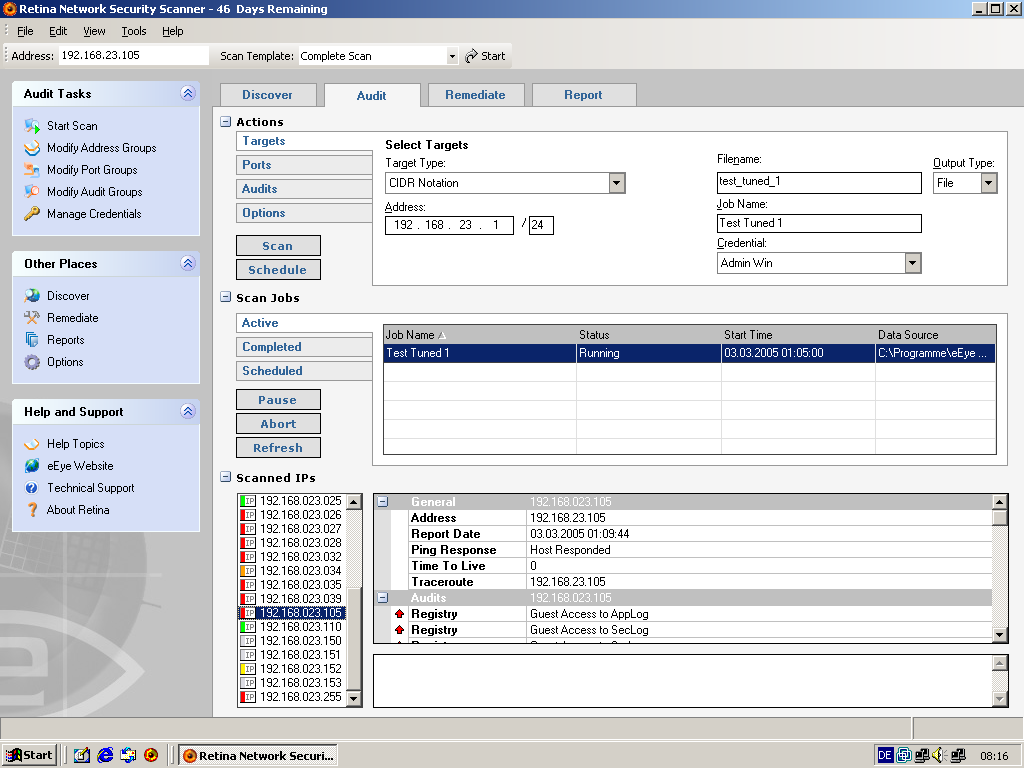
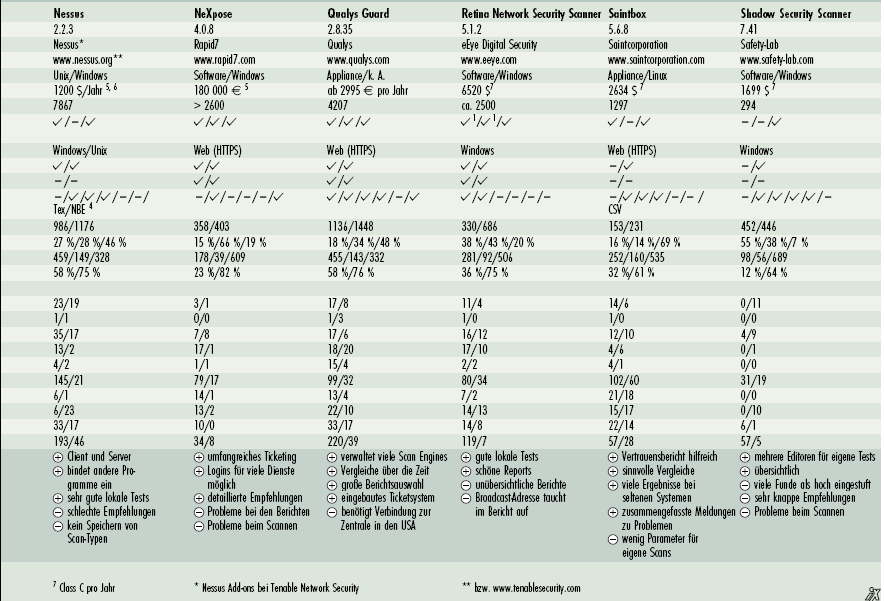
Retina was the tenth product in the test and appears in both the results chart and the printed comparison table, but its descriptive page was never written into the wiki — only the screenshot above survived in the media folder. The scores and the iX verdict below are taken from the published comparison table; the prose walkthrough the other nine scanners have is genuinely lost.
- Good local tests
- Attractive reports
- Confusing reports
- Broadcast address shows up in the report
SAINT Saintbox
Saintcorporation · version 5.6.8 · appliance/Linux · 1,297 tests
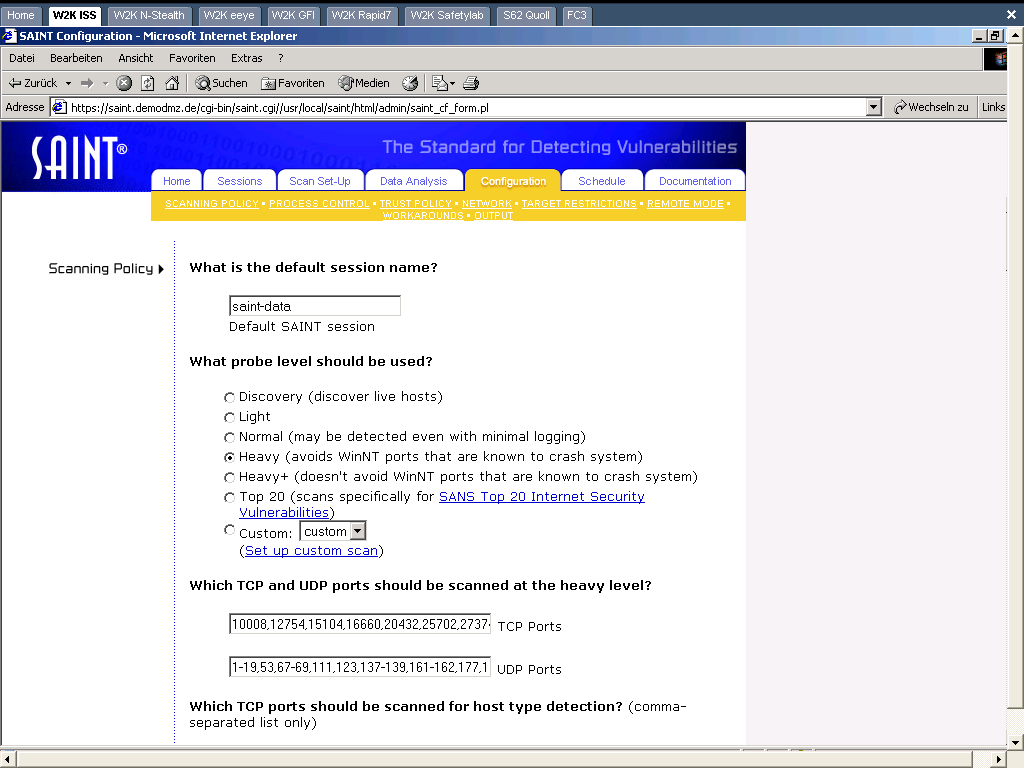
Saint provides an appliance that runs under Linux, and a software version is also available. One can specify from which IP numbers it should be possible to access the device.
The user interface is clear. A small, but useful choice of scan types, including the SANS Top 20 vulnerabilities, is available. Only a few parameters can be set for the scans and individual tests can be excluded. A user password can be specified for Windows, but unfortunately this is not possible for UNIX.
The log file of the scan is very detailed, making it less easy to assimilate. The results are either displayed directly or are summarised by the Saintwriter in a report. One special feature is the trust report, which analyses which of the tested computers trust which others. This can be done for DNS, NFS or other protocols. Thus, for example, the DNS server appears right at the top in this report, as this computer is used by all the systems. Vulnerabilities in such systems, which are trusted by many computers, therefore have a greater impact.
The descriptions of the problems are detailed and contain links to supplementary pages. The recommendations are formulated in a clear and detailed way. Information Assurance Vulnerability Alert (IAVA) numbers used by the US government are output. The product is CVE-certified.
- Trust report is helpful
- Meaningful comparisons
- Many results on rare systems
- Consolidated messages per problem
- Few parameters for custom scans
Shadow Security Scanner
Safety-Lab · version 7.41 · software/Windows · 294 tests
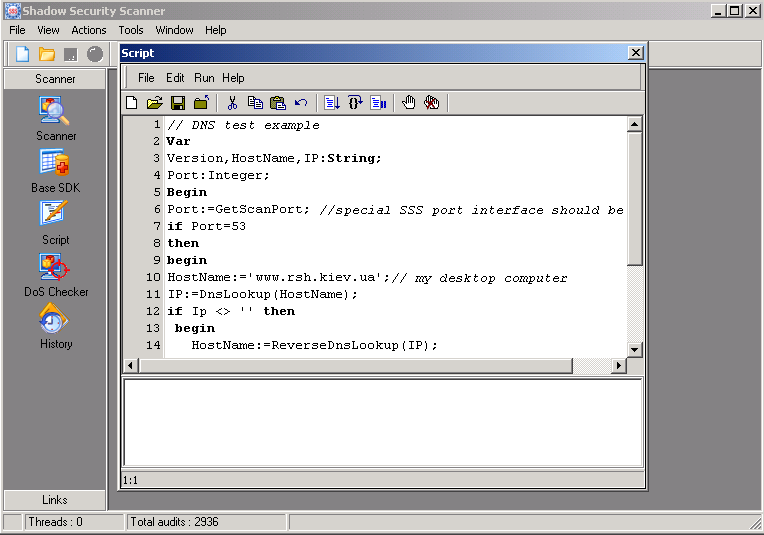
This was the second problematic scanner: Safety-Lab’s scanner could not be persuaded to carry out a complete scan on all the target systems. This meant that it was virtually excluded from the test. The manufacturer quickly provided a new version with which it was possible to perform the scans.
One special feature of this scanner is that two development environments are offered for separate tests. One works as a script editor with debugger. The second functions with a wizard which leads the user through all the fields necessary for the new test in six steps. Thus one can enter URLs, registry keys or other parameters for whose existence or whose values the scanner should test. It is only possible to specify users for Windows, and even this is only possible by entering the password in a file that the user has to create.
Before a new scan is started, a wizard asks for all the necessary data. If one chooses a “Quick scan”, the scanner is quickly finished. The “Full” scan, which scans all the ports, had still not finished after 20 hours and had to be aborted. Hence the second pass was also a quick scan, but with manually activated additional ports and administrator logon.
The problem descriptions are brief, and the recommendations as to how to rectify them are even briefer. They could at least specify a link to the manufacturer when all that appears is “Update this service”. At least the results of the test are shown as it proceeds. In some cases the results contain references to other pages, but this is the exception rather than the rule.
- Several editors for custom tests
- Clearly laid out
- Many findings rated as high
- Very terse recommendations
- Problems while scanning
Summary
Although the scanner hit rates for finding vulnerabilities are important if they are to be used in the corporate network, the choice of product should not depend solely on this consideration. To allow continuous monitoring of a network, it should be possible to install the scanner permanently. All except two of the products enable one to do this, but two of them require additional software from the manufacturer. The possibility of carrying out time-controlled scans, offered by all the products, is also important for regular monitoring.
If one wants to retain an overview in a large network, one needs a tool that can be easily incorporated into the business processes. This requires that it should be possible to export all the problems into existing solutions as tickets. Some of the products offered this, while all of them include their own ticket administration functionality. Another essential feature is remote management over a central console that is capable of controlling all the scanners in the network. It is not necessary, but it is helpful to assign the systems examined to groups and assess and report the results on the basis of membership of these groups.
It goes without saying that even after one or more scans have been carried out and all the problems identified have been rectified, a network cannot necessarily be regarded as secure and the possibility of attacks cannot be excluded. For no scanner will find every vulnerability, while not all the vulnerabilities that exist are known, and finally one should never underestimate the creativity of a human attacker. Nevertheless, it is worth using these programs, as the rapid detection and rectification of vulnerabilities will significantly enhance security in the network. And with such tools one can definitely make life more difficult for would-be attackers.
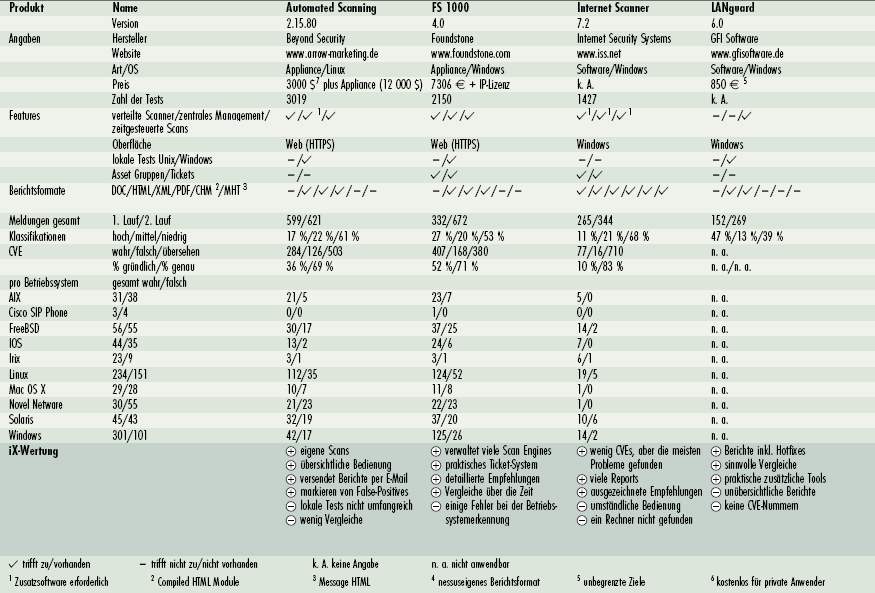
Full comparison table
The complete iX comparison matrix, transcribed from the printed table. Facts about the products, feature support, aggregate findings and the per-operating-system breakdown of true versus false findings.
| Automated Scanning | FS 1000 | Internet Scanner | LANguard | Nessus | NeXpose | Qualys Guard | Retina | Saintbox | Shadow Security Scanner | |
|---|---|---|---|---|---|---|---|---|---|---|
| Product details | ||||||||||
| Version | 2.15.80 | 4.0 | 7.2 | 6.0 | 2.2.3 | 4.0.8 | 2.8.35 | 5.1.2 | 5.6.8 | 7.41 |
| Vendor | Beyond Security | Foundstone | Internet Security Systems | GFI Software | Nessus* | Rapid7 | Qualys | eEye Digital Security | Saintcorporation | Safety-Lab |
| Website (2006) | arrow-marketing.de | foundstone.com | iss.net | gfisoftware.de | nessus.org** | rapid7.com | qualys.com | eeye.com | saintcorporation.com | safety-lab.com |
| Type/OS | Appliance/Linux | Appliance/Windows | Software/Windows | Software/Windows | Unix/Windows | Software/Windows | Appliance/n. s. | Software/Windows | Appliance/Linux | Software/Windows |
| Price | 3,000 $7 plus appliance (12,000 $) | 7,306 € + IP licence | n. s. | 850 €5 | 1,200 $/year5, 6 | 180,000 €5 | from 2,995 € per year | 6,520 $7 | 2,634 $7 | 1,699 $7 |
| Number of tests | 3,019 | 2,150 | 1,427 | n. s. | 7,867 | > 2,600 | 4,207 | approx. 2,500 | 1,297 | 294 |
| Features | ||||||||||
| Distributed scanners / central management / scheduled scans | ✓ / ✓1 / ✓ | ✓ / ✓ / ✓ | ✓1 / ✓1 / ✓1 | – / – / ✓ | ✓ / – / ✓ | ✓ / ✓ / ✓ | ✓ / ✓ / ✓ | ✓1 / ✓1 / ✓ | ✓ / – / ✓ | – / – / ✓ |
| Interface | Web (HTTPS) | Web (HTTPS) | Windows | Windows | Windows/Unix | Web (HTTPS) | Web (HTTPS) | Windows | Web (HTTPS) | Windows |
| Local tests Unix/Windows | – / ✓ | – / ✓ | – / – | – / ✓ | ✓ / ✓ | ✓ / ✓ | ✓ / ✓ | ✓ / ✓ | – / ✓ | – / ✓ |
| Asset groups / tickets | – / – | ✓ / ✓ | ✓ / ✓ | – / – | – / – | ✓ / ✓ | ✓ / ✓ | ✓ / ✓ | – / – | – / – |
| Report formats DOC / HTML / XML / PDF / CHM2 / MHT3 | – / ✓ / ✓ / ✓ / – / – | – / ✓ / ✓ / ✓ / – / – | ✓ / ✓ / ✓ / ✓ / ✓ / ✓ | – / ✓ / ✓ / – / – / – | – / ✓ / ✓ / ✓ / – / – (also Tex/NBE4) | – / ✓ / – / – / – / ✓ | ✓ / ✓ / ✓ / ✓ / – / ✓ | ✓ / ✓ / – / – / – / – | – / ✓ / ✓ / ✓ / – / – (also CSV) | – / ✓ / ✓ / ✓ / ✓ / – |
| Findings | ||||||||||
| Total messages, 1st / 2nd pass | 599 / 621 | 332 / 672 | 265 / 344 | 152 / 269 | 986 / 1176 | 358 / 403 | 1136 / 1448 | 330 / 686 | 153 / 231 | 452 / 446 |
| Classification high / medium / low | 17 / 22 / 61 % | 27 / 20 / 53 % | 11 / 21 / 68 % | 47 / 13 / 39 % | 27 / 28 / 46 % | 15 / 66 / 19 % | 18 / 34 / 48 % | 38 / 43 / 20 % | 16 / 14 / 69 % | 55 / 38 / 7 % |
| CVE true / false / missed | 284 / 126 / 503 | 407 / 168 / 380 | 77 / 16 / 710 | n. a. | 459 / 149 / 328 | 178 / 39 / 609 | 455 / 143 / 332 | 281 / 92 / 506 | 252 / 160 / 535 | 98 / 56 / 689 |
| % thorough / % exact | 36 / 69 % | 52 / 71 % | 10 / 83 % | n. a. | 58 / 75 % | 23 / 82 % | 58 / 76 % | 36 / 75 % | 32 / 61 % | 12 / 64 % |
| Per operating system — true / false findings | ||||||||||
| AIX (31/38 total) | 21 / 5 | 23 / 7 | 5 / 0 | n. a. | 23 / 19 | 3 / 1 | 17 / 8 | 11 / 4 | 14 / 6 | 0 / 11 |
| Cisco SIP Phone (3/4) | 0 / 0 | 1 / 0 | 0 / 0 | n. a. | 1 / 1 | 0 / 0 | 1 / 3 | 1 / 0 | 1 / 0 | 0 / 0 |
| FreeBSD (56/55) | 30 / 17 | 37 / 25 | 14 / 2 | n. a. | 35 / 17 | 7 / 8 | 17 / 6 | 16 / 12 | 12 / 10 | 4 / 9 |
| IOS (44/35) | 13 / 2 | 24 / 6 | 7 / 0 | n. a. | 13 / 2 | 17 / 1 | 18 / 20 | 17 / 10 | 4 / 6 | 0 / 1 |
| Irix (23/9) | 3 / 1 | 3 / 1 | 6 / 1 | n. a. | 4 / 2 | 1 / 1 | 15 / 4 | 2 / 2 | 4 / 1 | 0 / 0 |
| Linux (234/151) | 112 / 35 | 124 / 52 | 19 / 5 | n. a. | 145 / 21 | 79 / 17 | 99 / 32 | 80 / 34 | 102 / 60 | 31 / 19 |
| Mac OS X (29/28) | 10 / 7 | 11 / 8 | 1 / 0 | n. a. | 6 / 1 | 14 / 1 | 13 / 4 | 7 / 2 | 21 / 18 | 0 / 0 |
| Novell NetWare (30/55) | 21 / 23 | 22 / 23 | 1 / 0 | n. a. | 6 / 23 | 13 / 2 | 22 / 10 | 14 / 13 | 15 / 17 | 0 / 10 |
| Solaris (45/43) | 32 / 19 | 37 / 20 | 10 / 6 | n. a. | 33 / 17 | 10 / 0 | 33 / 17 | 14 / 8 | 22 / 14 | 6 / 1 |
| Windows (301/101) | 42 / 17 | 125 / 26 | 14 / 2 | n. a. | 193 / 46 | 34 / 8 | 220 / 39 | 119 / 7 | 57 / 28 | 57 / 5 |
1 additional software required · 2 compiled HTML module · 3 message HTML · 4 Nessus’s own report format · 5 unlimited targets · 6 free for private users · 7 class C per year · * Nessus add-ons from Tenable Network Security · ** and www.tenablesecurity.com
Appendix: NSFOCUS Aurora
This section was not part of the iX test. It was contributed to the wiki in May 2007 by the vendor itself, under the wiki’s rule that anyone affiliated with a vendor must say so. It is reproduced here for the record as vendor copy, not as an independent assessment.
NSFOCUS is a vendor from China. The following is the vendor’s own overview of its vulnerability assessment product, NSFOCUS AURORA.
The network security condition is becoming more and more serious. Thousands of network security vulnerabilities are discovered and released each year. Vectors of attackers keep on changing. It is proved that almost ninety-nine percent attacks are launched by exploiting unfixed vulnerabilities. Enterprises even having deployed the firewall, intrusion detection system and anti-virus software are still suffering from vulnerability attacks and incurs great economic loss.
In one word, most customers are lack of a collection of comprehensive and effective vulnerability management work flow and fail in regular vulnerability assessment and remediation. In order to effectively avoid the loss caused by attacks, customers are supposed to learn about the network security vulnerability as early as possible and take measures to prevent them from being exploited at the earliest opportunity.
AURORA Remote Security Assessment System has the ability to diagnose the security vulnerability immediately and proactively and provide professional prevention suggestions.
About this page
Between 2006 and 2011 this material lived at
www.vulnerability-assessment.de as the VAW — Vulnerability Assessment
Wiki, running on DokuWiki. The wiki opened with this article and invited practitioners
to add their own experience, under a simple charter: write only about what you have used
yourself, introduce yourself, and if you are affiliated with a vendor, say so.
The wiki is now closed and preserved here as a single static document. Nothing has been added to the substance of the article; the only editorial changes are the conversion of the original German comparison table into machine-readable HTML, the folding of the ten individual scanner pages into one page, and the restoration of eEye Retina to the line-up, which the wiki had always been missing.
The author was a security consultant at HiSolutions AG in Berlin at the time of writing, a Certified Information Systems Security Professional (CISSP), and had worked for several years as a penetration tester.